Create Your Own Tarot Cards Instantly with Canva
Designing a complete set of tarot or oracle cards used to be a significant undertaking. It often required advanced graphic design software, a deep understanding of print specifications, and a considerable investment of time. For many artists, writers, and spiritual entrepreneurs, the gap between having a creative vision for a deck and holding the finished product felt vast. A dedicated tarot card template for Canva effectively closes that gap, transforming the process from a technical challenge into an accessible, enjoyable act of creation. It provides a structured yet flexible foundation, allowing you to focus entirely on the art and meaning of your cards.
What This Canva Template Actually Provides
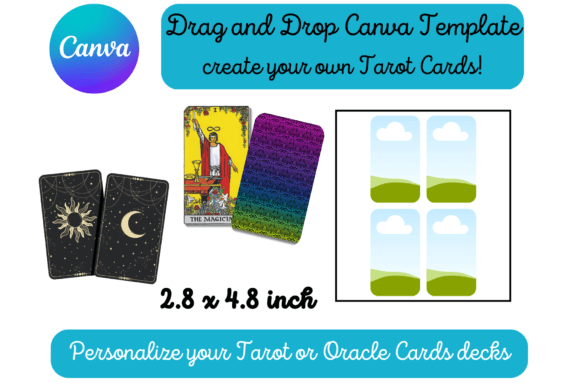
At its core, this is a practical design asset. You receive a PDF containing a direct link to a Canva template. Upon opening it, you find two pages, each populated with a grid of empty frames. These aren't just random boxes; they are precisely sized to the standard tarot card dimensions of 2.75 inches by 4.75 inches. This attention to scale is crucial. It means that when you design within these frames and print the pages on standard 8.5 x 11 inch paper, your cards will be ready to cut out at the correct size, with no frustrating resizing or guesswork involved.
The template's visual style is intentionally minimal. The frames are clean and unobtrusive, serving as a neutral canvas. This isn't a pre-designed deck with fixed artwork; it's a professional tool. Think of it like a set of high-quality, pre-measured mats for a picture framer. The value is in the precision and the time saved, not in decorative elements that would limit your creative direction. The personality of the final deck comes entirely from you—the artist, the brand, the storyteller.
A Practical Tool for Diverse Creators
The applications for this type of creative font and layout template extend far beyond personal spiritual projects. Its drag-and-drop nature in Canva makes it a powerful resource for a wide range of professionals and hobbyists.
- For Entrepreneurs and Small Business Owners: Imagine creating a custom set of branded affirmation cards to include with product orders or sell as a standalone item. A wellness coach could design a deck of mindfulness prompts, or a business strategist could create a set of motivational cards for clients. The template ensures a polished, professional result that strengthens brand identity.
- For Marketers and Content Creators: A unique deck can be a fantastic lead magnet or social media content series. You could design a "Card of the Day" for Instagram, using the template to maintain visual consistency across all 78 or more posts. It’s a tangible way to engage an audience and offer value.
- For Publishers and Bloggers: Writers exploring themes of mythology, psychology, or storytelling can design companion oracle decks for their books or blogs. This adds a multi-sensory dimension to their work and creates another product to offer their readership.
- For Crafters and Hobbyists: The desire to make a truly personal tarot deck—perhaps featuring family photos, pet portraits, or original paintings—is now simple to fulfill. The template removes the technical barriers, making the printing process straightforward and reliable.
Ensuring a Polished Final Product
While the template handles the technical setup, the success of your deck still relies on fundamental design principles. The template is a vehicle, but you are the driver. Considering a few key areas will elevate your project from a simple printout to a cohesive, professional-looking deck.
Visual Hierarchy and Readability: Each card needs a clear focal point. Will you use a central image with the card's title at the bottom? Or perhaps a full-bleed illustration with the number and name overlaid? Establish a consistent system. For any text, choose a typeface that is legible at a small size. A beautiful script font might work for a title on The Empress, but it could become an unreadable squiggle on a busy background. Pairing a clear sans serif font for body text with a more expressive display font or script font for titles is a classic and effective approach.
Consistency Across the Deck: A cohesive deck feels intentional. This involves more than just using the same frame. Consider a limited color palette, a consistent style of illustration (e.g., line art, watercolor, digital collage), and a unified approach to typography. The template ensures the physical size is consistent; your job is to ensure the artistic and branding elements are, too. This consistency builds a recognizable brand identity if you plan to sell the decks.
Print-Ready Considerations: The template is set up for standard letter-size printing. For the best results, use the highest quality images you can. When you're ready to print, select a heavier cardstock paper—something in the 80-110 lb cover weight range—so the cards feel substantial and durable. Remember to account for a small margin of error when cutting, and consider rounding the corners with a corner punch for a truly professional finish that mimics commercial decks.
Choosing and Using Your Design Assets
This Canva template is a cornerstone design asset, but you'll likely want to bring in other elements. When selecting fonts, images, or graphic overlays from Canva's library or elsewhere, think about their personality and how they align with the theme of your deck. A handwritten font might suit a rustic, folk-inspired deck, while a clean, modern sans serif could be perfect for a minimalist, psychological oracle.
Test your font pairings directly within one of the card frames. Type out a sample title and see how it interacts with your chosen artwork. Does it get lost? Does it overpower the image? This kind of practical testing is invaluable. The template allows you to experiment freely because the underlying structure is already sound. You are free to play with the creative aspects—typography, color, and imagery—knowing the final print output will be correct. This freedom is what makes it such an effective tool for turning a vision into a tangible reality, whether for personal use, as a gift, or as a new product for your business.