Mastering Retro Groovy Wavy Text in Canva
There is a specific energy that defines the modern "Retro Groovy" aesthetic. It is a revival of the late 1960s and 1970s counter-culture typography, characterized by fluid, undulating baselines and heavy, rounded letterforms. Visually, this style is defined by its "wavy" distortion—letters that appear to be melting, bouncing, or floating across the page. It is a typeface style that refuses to sit still, creating an immediate sense of movement and fun. When you utilize CANVA Editable Retro Groovy Wavy Text, you are tapping into a visual language that speaks to nostalgia, creativity, and a laid-back, positive attitude.
The appeal of this typography lies in its personality. Unlike rigid, corporate sans-serif fonts, groovy text feels organic and handmade. It suggests that a brand is approachable, playful, and in touch with current design trends. The "wavy" element breaks the grid structure of traditional design, which helps capture attention in a crowded digital space. It works exceptionally well for projects that need to stand out immediately without relying on loud colors or complex imagery.
The Practical Application of Display Typography
As a display font, CANVA Editable Retro Groovy Wavy Text is best suited for headlines, titles, and short, punchy statements. It is not designed for long-form body text; its complex curves would reduce readability in small sizes. Instead, think of this typeface as the "voice" of your design, while a simpler serif font or sans-serif font acts as the supporting narrator.
This style excels in specific environments. For social media graphics, particularly Instagram stories or Pinterest pins, wavy text creates an immediate focal point. In packaging design, especially for artisanal goods, cosmetics, or lifestyle products, it adds a layer of tactile warmth. It is also a powerful tool for logo design for startups wanting to convey a modern yet retro vibe. When used in editorial design, such as magazine pull-quotes or chapter headers, it provides a stark, engaging contrast to standard body copy.
Streamlining the Design Process with Typecraft
Historically, creating warped or wavy text required advanced software skills, specifically using vector manipulation tools like Adobe Illustrator or Inkscape to manually adjust anchor points and bezier curves. This process was time-consuming and often frustrating for those without a background in vector graphic design.
Canva has simplified this workflow significantly with the release of the Typecraft app. This integration allows users to apply complex typographic distortions directly within the Canva editor. You no longer need to export assets or use third-party warp tools. The app handles the heavy lifting of the "groove" effect, allowing you to focus on the creative direction.
However, even with Typecraft, starting from a blank canvas requires time. To accelerate your workflow, I have prepared a set of editable templates specifically designed for this aesthetic. These assets bridge the gap between professional typography and accessible design tools.
Utilizing the Editable Template Bundle
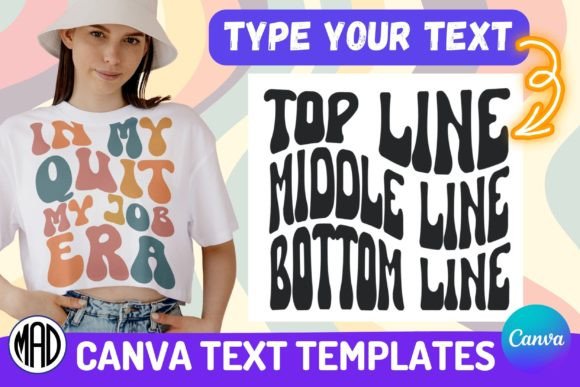
To make the design process as efficient as possible, I have compiled a comprehensive resource. In the download folder, you will find a direct link to a Canva tutorial step-by-step guide and 3 template pages. These templates cover various layout structures to suit different messaging needs:
- 2-Line Designs: Ideal for short, impactful slogans or brand names.
- 3-Line Designs: Perfect for product titles with a subtitle or a date.
- 4-Line Designs: Great for longer quotes or detailed event information.
The workflow is designed to be intuitive. Once you open the templates in Canva, you simply click on the text element to launch the Typecraft app. From there, you can edit the text content, change the colors, and adjust the warp intensity to fit your brand identity. The "Update Element" function ensures your changes are applied instantly. This method allows you to produce premium font effects in minutes rather than hours.
Advanced Customization with Inkscape
For designers who require absolute control over their vector graphics, or for those who need to create assets for print production where Canva’s export settings are insufficient, I have also included a tutorial for Inkscape. Inkscape is a free, open-source vector graphics editor.
Using this method, you can manually manipulate the paths of the letters. This is particularly useful if you need to connect letters in a custom way or if you are creating a complex logo design where every curve must be precise. While the Canva templates offer speed, the Inkscape method offers total creative freedom.
Strategic Considerations for Your Brand
When integrating CANVA Editable Retro Groovy Wavy Text into your brand identity, consistency is key. Because this style is so distinct, it can easily overpower a design if not balanced correctly. Ensure you pair it with a clean, neutral background and a highly legible body font—such as a geometric sans-serif—to maintain visual hierarchy.
Furthermore, always consider your audience's perception. This style resonates strongly with demographics interested in lifestyle, fashion, and creative arts. It may be less appropriate for highly technical or corporate financial reporting. By matching the typography to the audience's expectations, you increase engagement and recognition.
Please note: "IN MY ERA" designs featured in examples could be trademarked. Always ensure you have the right to use specific phrases before publishing your final commercial projects.
This product is a DIGITAL FILE – INSTANT DOWNLOAD. No physical product will be shipped. Digital files are compressed in a ZIP folder. To use the files, you must unzip them using local software on your system.
Kind regards,
Marina – Marina Art Design